 Owlio
ENS Name to Address: Check the Wallet You Track
Find the right address behind a .eth name, check the record and network, and understand why Owlio keeps tracking the wallet you added when the name changes.
To turn an ENS name into an address for portfolio tracking, inspect the name’s current Ethereum address record and check the full 0x address before adding it. Owlio 1.1.0 does not accept .eth names directly. It tracks the raw address you enter, so a later change to the name’s record will not make Owlio switch wallets.
You can make these checks without connecting a signing wallet or changing the name. The ENS workflow and Owlio’s release-code behavior were checked on 5 October 2026; the Chrome Web Store listed version 1.1.0.
Which address behind an ENS name do you need?
An ENS name is a readable identifier with records attached to it. A resolver is the system that returns those records. A name such as example.eth can point to a wallet address, but the name is not itself a wallet and does not contain its funds or private keys. This is an illustrative name, not a live address recommendation.
For an Ethereum portfolio, look for the ETH Address, the record that points to an Ethereum address. ENS explains this in its ETH Address guide. Do not automatically copy an address from the name’s ownership details instead.
| ENS field | What it describes | When it is relevant |
|---|---|---|
| ETH Address | The name’s Ethereum address record | Tracking the address the name points to |
| Owner | The wallet that holds the name | Investigating ownership of the name |
| Manager | The role allowed to edit its records | Investigating who can change those records |
| Primary Name | A name an address uses for display in supporting apps | Understanding a name shown beside an address |
The ENS roles guide distinguishes name ownership, record management and the destination address. They can be different. Names and subnames can also have different ownership arrangements, so do not infer a person’s entire portfolio from one role.
A forward lookup asks which address a name points to. A reverse lookup asks which name an address uses for display. ENS documents both directions of resolution. A familiar name on an explorer is a reason to check the address, not a substitute for reading the current record.
Find and verify the full Ethereum address
Start with the exact name from a source you already trust. If someone sent you a name in a message, confirm it through a separate known channel before treating it as their wallet. Similar-looking characters can produce different names; ENS’s lookalike-name guidance explains the risk. A successful lookup proves that a record was returned, not who controls the receiving wallet.
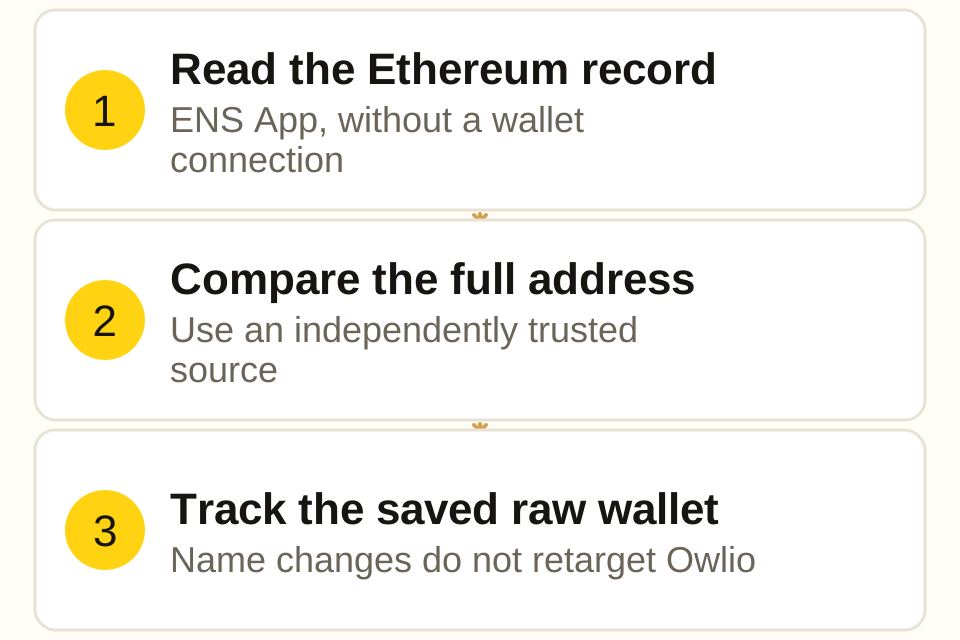
- Open the official ENS App by checking its domain, rather than following a promoted claim or recovery link. Search for the complete name, including
.eth. ENS confirms that public name details can be searched without a wallet. - Open the name’s Records view and find the address entry labeled eth. The profile can also show addresses, while Ownership shows separate roles. Interface labels may be localized. The task is to read the current Ethereum address record; you do not need Edit Profile or a wallet connection.
- Copy the full
0xaddress, then inspect the pasted value. Do not copy the shortened form with an ellipsis or a profile URL. For Owlio’s Ethereum-compatible (EVM) input, the address must contain0xfollowed by 40 hexadecimal characters: digits0-9and lettersa-f, with letters in either case. - If you want a particular person’s wallet, compare the entire address with one they publish through a source you independently trust. If it is your wallet, compare it with the full receiving address shown by your own wallet. A match in only the first and last few characters is insufficient.
- Record the exact name, the record’s network, the full address and the date of the check. These details let you distinguish a later name change from a change in that wallet’s balances.
If the explicit Ethereum entry is absent, pause and check whether Default or custom resolution supplies an Ethereum address, as explained below. If you cannot verify an Ethereum result, stop. Do not substitute the Owner or Manager address just to fill the tracker. An error does not establish that the intended wallet is empty, and a different role does not establish the intended destination.
Check the network before combining portfolios
An ENS name can contain several address records. Its Ethereum entry does not establish its Bitcoin or Solana address, and an address specified for Base can differ from its Ethereum address. ENS’s guide to other-chain records explains the distinction.
ENS also has a Default address for EVM chains without a specific record. The Default address documentation says a chain’s own record takes priority; fallback depends on resolver support. A missing Ethereum-specific entry therefore does not always mean no address can resolve on Ethereum. This guide deliberately uses an explicit Ethereum record. If the name relies on Default or a custom resolver, verify the actual Ethereum result with a tool that supports that resolver before tracking it; do not guess from another field.
When you add that verified 0x address to Owlio, the extension reads the same raw address on its supported EVM networks. It does not collect or resolve all the other addresses attached to the ENS name. If a separate chain record names a different wallet, verify that wallet separately. Our multiple-wallet guide covers adding verified raw addresses and interpreting the combined view.
This distinction matters especially for contract-based accounts: their addresses may differ between chains. Check the intended network and full address rather than assuming that every holding associated with a readable name belongs in one total.
Add the verified address to Owlio
Once the full address is verified, you can install Owlio from the Chrome Web Store. These steps refer to version 1.1.0.
- On the initial screen, paste the full address and press Add address. If you already have accounts, open All accounts, paste into Enter address, and press Add.
- If you see an unsupported-format message, check that you pasted a full raw address. A
.ethname, an explorer URL or a shortened0x…string is not accepted on this path. - If Owlio says the address is already in your list, inspect the existing account. Capitalization changes do not make the same EVM address a second wallet.
- Check the account and the portfolio’s Data status. If a source has failed, the display may retain an earlier balance snapshot. Retry now retries the portfolio source; it does not repeat an ENS lookup.
Owlio’s validator checks address format. An accepted address is not proof that you chose the correct wallet. A mixed-case checksum uses the capitalization of letters to help detect typing mistakes. Version 1.1.0 does not check this checksum. Compare the whole address before adding it, even if the input is accepted.
The account list abbreviates long addresses. Its shortened display helps you find a row but cannot replace the full-address comparison. If the address is correct and the value still differs from a wallet or explorer, use the balance-mismatch guide to check coverage, prices and data freshness.
What happens when the ENS record changes?
Decide whether your intention is to watch a particular wallet or whichever wallet a name currently points to. These are different tracking rules.
For a fixed wallet, keep the verified raw address. A later change to the ENS record does not change that wallet’s address or move its existing assets. Owlio continues requesting data for the stored wallet.
To follow a name’s current Ethereum destination, look it up again separately and repeat the full-address check. If the record now points to a different address, verify that address before deciding to add it. You may want to keep both raw wallets visible while you check what changed. Updating Owlio’s portfolio data alone will not discover or add the new address.
Do not infer the current destination from a name’s transfer history alone. Ownership and address records need separate checks. If you choose to remove an old account from Owlio, note that removal also deletes its local wallet data; it is not merely a change of display name.
Diagnose a lookup or tracking problem
| What you see | What to check | Next step |
|---|---|---|
| Name absent or lookup fails | Exact name, current record and lookup service | Verify independently; do not guess an address |
| Owner differs from eth record | Which wallet you intended to track | Use the verified destination for that goal |
| No explicit eth entry | Whether a supported Default or custom resolution applies | Verify the Ethereum result before adding |
Owlio rejects .eth |
The raw address field requires an address | Look up and verify full 0x separately |
| Owlio reports a duplicate | Same raw address already stored, including case variants | Inspect the existing account |
| Name now points elsewhere | Compare today’s full record with the earlier address | Decide which raw wallets to keep tracking |
| Correct address, unexpected total | Source status, network coverage and freshness | Check the balance-mismatch guide |
Neither ENS lookup nor read-only portfolio viewing requires entering a recovery phrase or signing a wallet transaction. If a supposed lookup asks you to claim, approve or repair something, stop and check what operation the site is requesting. Editing name records is a separate operation outside this guide.
A readable name does not make an address private. Owlio stores your account list in this browser, but portfolio requests go directly to public data services that can see the queried address and your IP, as described in its privacy policy.
Frequently asked questions
Can I enter an ENS name directly in Owlio?
Not in Owlio 1.1.0. Look up the intended Ethereum address separately, verify the whole address, and paste the full 0x address. The extension does not resolve .eth names.
Is the ENS Owner address the address I should track?
Only if your goal is to track the wallet holding the name. To track the wallet a name points to on Ethereum, inspect its ETH Address record. Owner, Manager and ETH Address can be different.
Will Owlio follow the name if its address changes?
No. Owlio stores the raw address you added. Updating portfolio data reads that same wallet; it does not look up the ENS name again. Verify a new address separately before deciding to add it.
Does looking up a name require a wallet signature?
Viewing a public name and its records in the ENS App does not require connecting a wallet or signing. Editing records and transferring a name are different operations, outside this guide.
Does one ENS lookup include wallets on every chain?
No. A name can have different records for different chains. Adding an Ethereum 0x address to Owlio tracks that raw address on its supported Ethereum-compatible networks; it does not import every address record on the name.