 Owlio
Ethereum internal transactions: where to find received ETH
A contract can send ETH during another transaction. Find that movement under the parent hash, then distinguish it from today's native balance.
ETH sent by a contract can reach your address without a separate entry in your wallet’s ordinary activity. On Ethereum Mainnet, look for the movement under Internal Txns in the explorer and open its parent transaction. Match the recipient, native ETH amount and execution result before concluding that the transfer succeeded.
The missing row alone does not prove that money is missing. MetaMask’s current help page describes this history limitation while noting that received funds affect the account balance. That is a documented display limitation, not a test of your wallet or proof of a particular payment.
What an internal transaction represents
A signed transaction can call a contract, and that contract can send ETH while its code runs. The recipient of this inner movement may differ from the destination shown at the top of the transaction page.
Solidity’s documentation explains that a call between contracts belongs to the overall transaction; it does not create a new transaction of its own. The explorer’s internal record points into that execution. You should not expect a second independently signed transaction just for this movement.
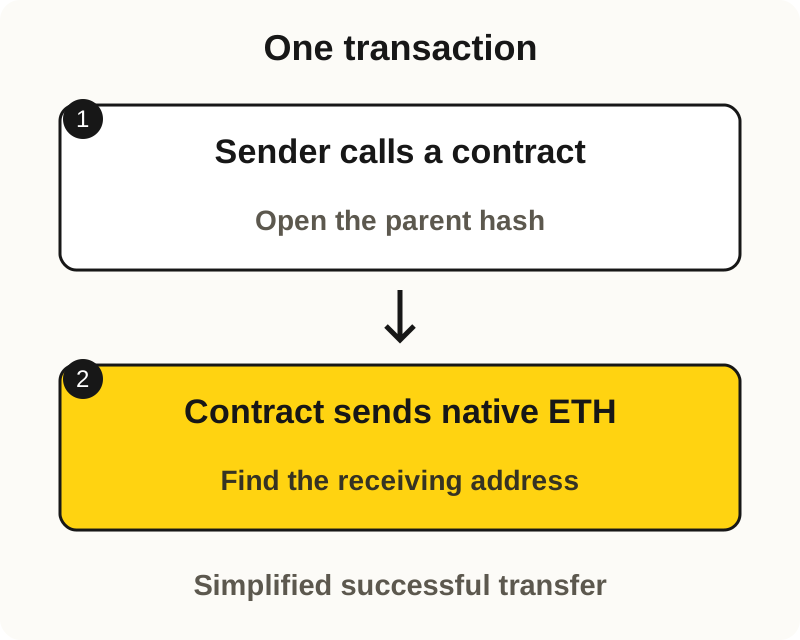
Internal does not mean off-chain, hidden or locked. The resulting ETH is part of the address’s native balance. You do not add an internal transfer amount on top of that balance to count your holdings.
Find the incoming ETH movement
Use the full receiving address and the original transaction hash, if available. Open a familiar explorer through a trusted route. These public checks do not require connecting a wallet, signing anything or sharing a recovery phrase.
- Select Ethereum Mainnet and the receiving address. The same-looking address on another network is a different balance check. Confirm that the expected asset is native ETH. ETH and WETH are separate balances.
- Open Internal Txns on the address page. Etherscan distinguishes contract-mediated ETH movements from ordinary transactions and token-transfer records. Use the expected time and amount to locate a candidate, then open its parent hash. If you already have the hash, inspect the internal movements associated with it.
- Match the inner recipient and amount. Compare the complete destination address with the intended recipient. Read the native ETH value, not a dollar estimate or a similarly named token. A zero-value call is not a positive ETH payment.
- Check for errors and rollback. Read the parent result and any error or reverted markers on the relevant call path. A visible attempted transfer is not enough: a later revert in an enclosing call can undo it. If the explorer does not make this clear, preserve the uncertainty rather than counting the amount as received.
- Check the current native balance separately. Record the block or time of that read. It helps establish current holdings, but later transfers or other activity may have changed the amount since the transaction you found.
Save the network, parent hash, block, recipient, amount and any error indicators together. This gives wallet or protocol support a specific public record to investigate when the views disagree.
A raw call trace is not a list of payments
An explorer can reconstruct what happened during execution as a trace: a tree of calls. Geth’s call tracer includes call types, addresses, values, nested calls and errors. These fields need context.
Do not sum every value in that tree. For example, a DELEGATECALL destination identifies code being executed, not a new recipient of an ETH payment. Explorer transfer lists may also filter the underlying calls, so an internal-transfer view is not necessarily the complete trace.
Rollback is another reason to read the path rather than one row. Solidity’s error-handling documentation explains that an exception can undo changes in a call and its subcalls. A successful parent transaction can still contain a failed inner attempt whose error was handled.
If you expected an ERC-20 token, use the separate successful transaction and token-transfer guide. Finding an internal ETH record does not establish delivery of that token.
Keep the balance and the history record separate
Ethereum’s native balance query reads an address at a specified block or block tag. Today’s balance does not identify which transaction produced it. Even a difference between two block balances can include multiple transactions. A failed read or missing trace is unavailable evidence, not a zero balance or proof that no transfer occurred.
Owlio 1.1.0 reads the current native ETH balance for an Ethereum address you add without connecting a wallet or signing a transaction. Use an explorer for the parent transaction and its internal movements; the portfolio number does not explain that call path. Address lists are stored locally, while data providers can see the queried address and your IP, as described in the privacy policy.
An exchange account adds a separate question: whether the provider credited its own customer ledger. On-chain receipt at a deposit address does not establish that credit. Check the provider’s current deposit rules and support record instead of assuming that a wallet-history explanation resolves it.
There is no extra claim or unlock step merely because an ordinary history row is missing. If a protocol withdrawal still requires a claim, that is a different workflow to verify in its documentation. Do not send another payment just to make an activity entry appear. These checks are based on primary documentation reviewed on 6 November 2026; no live transfer was performed for this article.
Frequently asked questions
Is ETH received through an internal transaction a different token?
No. A successful native ETH transfer affects the receiving address's ETH balance. Internal describes how the movement happened during execution, not a separate token or a hidden balance to add again.
Does Internal Txns mean my transfer is still pending?
No. It is an explorer category, not a confirmation status. Check the parent transaction's inclusion and result, and whether the relevant inner transfer was reverted.
Why does the internal transfer lead to the same transaction hash?
It happened within that parent transaction. A contract's inner call does not create a new independently signed transaction. The explorer may use a trace index to distinguish calls within the same execution.