 Owlio
CoinMarketCap vs CoinGecko vs DeBank vs Owlio: DeFi Tracking
All four tools can track public addresses. The useful distinction is what they recognize: wallet tokens, deposit or staking tokens, or positions inside DeFi protocols.
For wallet-based DeFi tracking, start with the positions you need to see. DeBank is the first option to try for supported lending and liquidity-pool positions on Ethereum-compatible (EVM) networks. CoinMarketCap and CoinGecko also track public addresses, alongside their market and portfolio tools. Owlio offers a Chrome side panel with local address storage and a narrower DeFi view based on recognized tokens representing deposits or staked assets.
If you hold tokens in a wallet, these tools may answer much the same question. If you have deposited them in a protocol or borrowed against them, a token list alone can miss part of the picture.
This comparison covers the address-tracking workflow. Product references were checked on 7 October 2026; the Owlio section covers the publicly listed 1.1.0 release. We publish Owlio, so its limitations are included under the same criteria as the other tools.
Compare what the dashboard actually covers
| Tool | Address-based view | Useful starting point | Check before relying on it |
|---|---|---|---|
| CoinMarketCap | On-chain address sync | Holdings alongside market research | Balance networks and individual DeFi positions |
| CoinGecko | Wallet Tracking | Holdings and profit/loss on supported tokens | EVM coverage, wallet limits and positions |
| DeBank | Public address profile | Supported protocol positions | Exact chain, protocol and update time |
| Owlio | Local address list | Browser side panel and recognized receipt tokens | Asset recognition and wider protocol coverage |
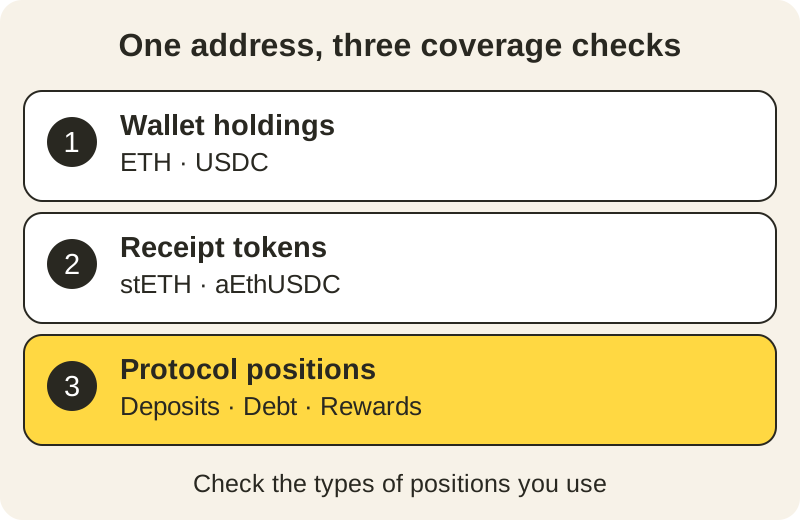
Check three types of data separately: tokens held directly by an address, receipt tokens issued for a deposit or stake, and positions inside a protocol. A tracker can support a network without showing every protocol position on it.
A receipt token represents a claim on a deposited or staked asset. Seeing that token does not necessarily mean the tracker also shows an associated loan, liquidation threshold, pool composition or unclaimed rewards.
CoinMarketCap: address sync alongside market research
Calling CoinMarketCap a manual-only tracker is outdated. Its Portfolio help page documents manual transactions, automatically updated on-chain addresses and supported exchange connections.
For this comparison, use the public-address portfolio, rather than entering a trade by hand or linking an exchange. CoinMarketCap’s setup and network guide describes signing into a CMC account and creating a portfolio with an address. It also separates balance support from transaction support; those lists should not be treated as interchangeable.
CMC is a reasonable starting point if you already use it to research coins and want to see the holdings from your wallet address there. Its documentation confirms address sync; it does not confirm complete coverage of loans, pool positions and rewards. Verify those positions individually before treating a portfolio total as your complete DeFi balance.
CoinGecko: Wallet Tracking and token performance
CoinGecko also offers an address-based option. Its Wallet Tracking guide describes holdings, portfolio value, profit and loss (P&L), and average purchase price for supported tokens. You paste a public address without connecting a wallet or signing a transaction.
The current Portfolio page presents Track Wallet separately from Build Portfolio. Track Wallet opens an account sign-in prompt. CoinGecko documents EVM network coverage and a free limit of two tracked wallets; check the current plan if you need more.
This suits someone who wants token holdings and performance inside CoinGecko’s existing web or mobile portfolio. It does not establish that the tracker will show every DeFi deposit, debt or liquidity-pool position. CoinGecko’s developer API is a data interface for software; a field available there is not proof that it appears in the Portfolio interface you use.
DeBank: inspect positions inside supported protocols
DeBank’s public profiles separate Wallet holdings from named protocols. During the check, its public address view showed lending, liquidity-pool and reward sections without a wallet connection.
Its protocol position model distinguishes assets, debt and net value (assets minus debt). This is why DeBank is the first tool to try here when the question is “Where are my deposits and loans?” rather than just “Which tokens does this address hold?”
Coverage still depends on the EVM chain and protocol. Inspect the position details and update time, and check the protocol’s own interface for an important deposit or loan. DeBank’s public profile is a hosted service, so opening an address there makes it part of the request to that service.
Owlio: a local side panel with a limited DeFi view
Owlio’s Chrome extension lets you keep several public addresses in a browser side panel without an Owlio account. The saved address list and settings stay in the browser; there is no Owlio server storing that portfolio.
Owlio 1.1.0 has a DeFi tab for recognized receipt tokens. The release includes selected staking tokens such as stETH, wstETH and rETH, and selected Aave v3 Ethereum deposit tokens. Those are token-based positions, not a complete reconstruction of every protocol.
Use Owlio if the daily task is checking supported holdings beside your other browser work. Use a tracker that shows protocol details as well when you need loan debt, a health factor (an indicator of liquidation risk), or the assets and rewards inside a liquidity pool. Owlio’s DeFi tab does not supply that full breakdown.
To fetch data, Owlio uses public data services. They receive the requested addresses and your IP address. The privacy policy explains this flow. For the wider account, history and privacy comparison, see DeBank vs Owlio.
Check the same address before choosing
Use one address with positions you already know. This is a practical check you can run, rather than a claim that the four dashboards produce identical totals.
- Choose the address mode. In CMC or CoinGecko, use address sync or Wallet Tracking. Open the public profile in DeBank, or add the public address in Owlio. Reading balances requires no seed phrase (wallet recovery words) or transaction signature.
- Confirm the chain. A price page for a coin does not establish support for your address on that network.
- Match a known wallet holding. Compare its quantity and network with a blockchain explorer (a site for viewing records on that network). Check quantity before comparing dollar values.
- Inspect a known DeFi position. Look for the deposit and, where relevant, debt and rewards. If you only see a receipt token, note which parts of the protocol position remain absent.
- Check freshness and valuation. Record the update time where shown, missing prices and unrecognized assets. Do not add a receipt token’s value to the value of the same underlying deposit.
If a position is missing, mark it not covered or not yet confirmed. An absent row is not evidence that the on-chain position is zero. The portfolio balance checklist helps separate missing assets, prices and data-source failures.
Which one fits your routine?
Choose CMC or CoinGecko when market research and token performance are the main task, after checking the address feature against your holdings. Try DeBank first when supported DeFi deposits, loans and pools are the main task. Choose Owlio when you want a local address list and a browser side panel, with its recognized-token DeFi view.
You can use two views for different questions. Keep one view for daily holdings and another for protocol details, then reconcile the same underlying position before combining any values. For an Owlio setup with several addresses, follow the multiple-wallet guide.
Frequently asked questions
Can CoinMarketCap and CoinGecko track a wallet automatically?
Yes. CoinMarketCap supports portfolios based on on-chain addresses. CoinGecko offers Wallet Tracking from a public address. These are separate from manually entered portfolios. Check supported networks and position coverage for the address you want to follow.
Which tracker should I try for loans and liquidity pools?
Start with DeBank for supported EVM networks (Ethereum and compatible networks) and protocols because it displays protocol positions, including lending and liquidity pools. Confirm that your particular position is recognized and check it against the protocol. No dashboard guarantees complete coverage.
Does Owlio track DeFi?
Owlio 1.1.0 has a DeFi tab for recognized receipt tokens, including selected staking and Aave deposit tokens. These tokens represent deposited or staked assets. That is narrower than a general view of protocol positions. It does not provide a complete breakdown of lending debt, health factors (indicators of liquidation risk) or liquidity pools.
Does adding a public address give a tracker control of my funds?
Reading a public address does not authorize spending. The address-tracking procedures described here need no transaction signature. Read-only access still shares information with the services receiving requests; Owlio's public data providers can see requested addresses and your IP address.