 Owlio
Disconnecting your wallet does not revoke token approvals
A disconnected wallet can still have an active token allowance. Separate connection, balance and spending permission before deciding what to change.
Disconnecting your wallet from a site does not revoke an existing token approval. The connection is a wallet permission; an ERC-20 allowance is a record in a token contract. To stop a particular spender using that allowance, you need to change it on-chain and check the resulting state.
This guide covers ordinary ERC-20 approvals on EVM networks. It separates a read-only check from an optional transaction. No recovery phrase or private key is needed to inspect a public address.
Connection, allowance and balance are different records
Disconnecting removes the site’s connection in your wallet. It does not erase public blockchain data or rewrite token contracts. MetaMask’s disconnect guide makes the approval distinction explicit.
In ERC-20, balanceOf reports how many tokens an address holds. allowance(owner, spender) reports how many of that token a particular spender is permitted to use. The spender is an address, often a contract. Its permission applies to this token on this network, not automatically to every asset in the wallet.
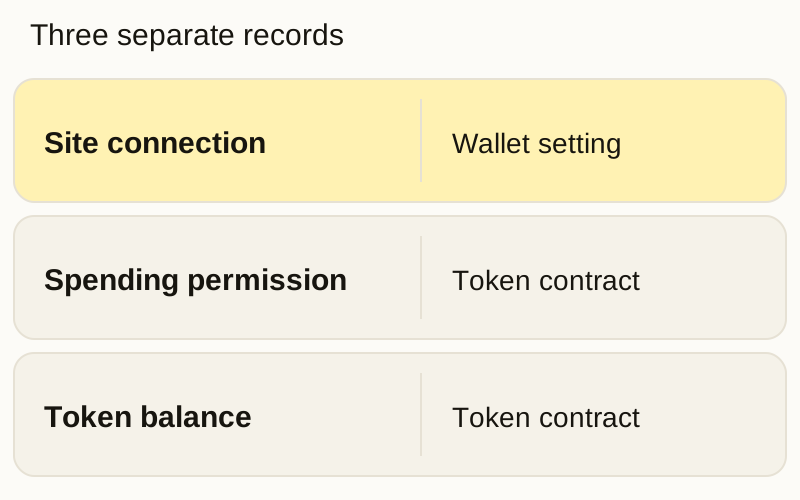
An authorized spender can call transferFrom within the token’s rules, available balance and allowance. You do not necessarily get another wallet confirmation for each such transfer. That is why an old permission can matter after you leave the site.
What a revocation changes
Consider a hypothetical address with 25 Token A and an allowance of 100 Token A for one spender. These are two records, not 125 tokens. Disconnecting leaves the allowance in place.
A successful ordinary approve(spender, 0) sets this allowance to 0. The token balance stays 25, assuming no other balance-changing transaction. The network fee is a separate expense in the native asset for a normal self-funded transaction. The approval explanation from Revoke.cash describes this zero-allowance change.
Inspect first, then verify the intended change
- Choose the owner and network. Copy your public wallet address and select the network where you gave the permission. The same
0xaddress on another chain has different contract state. Open the checker from its official address, not a link in an unsolicited token or message. - Inspect without signing. Revoke.cash’s guide allows entering a public address to view approvals. A supported explorer’s approval checker can also help. The service can see the address you query and your IP address. An empty indexed list does not prove that every permission on every network is absent.
- Identify one permission. Record the full token contract, spender address and current allowance. A familiar ticker or contract label is not enough. Verify the token and intended spender against authoritative project information before acting. Do not interact with an unknown token just because it appears in a list.
- If you choose to revoke, review the transaction. For an ordinary ERC-20 allowance, the intended change is zero for that spender. Connect the correct signing wallet only when making the change, and check the network, token contract and spender in its confirmation. Check the fee and native balance too. Stop if the request transfers tokens, sets a nonzero allowance or asks for an unexplained signature instead of the intended revocation. Never enter a recovery phrase into the checker.
- Check confirmed success and current state. Open the transaction in that network’s explorer. A pending or failed transaction does not confirm the revocation. After success, refresh the exact owner’s allowance for the same token and spender: it should be zero. A successful transaction receipt alone is not enough if the intended state did not change. If the checker cannot show the current value, the result remains unverified.
Repeat this check separately for other permissions you decide to change. The result describes the selected permission at the time checked.
Why one zero allowance is not a wallet audit
Other tokens, networks and spenders have separate permissions. NFT operator approvals, Permit2 and wallet session permissions also need their own checks; this ERC-20 sequence does not cover them all. Revocation cannot reverse an earlier transfer or fix compromised signing keys.
Some tokens support signed approvals under ERC-2612. A still-valid, unsubmitted permit signature can later set an allowance. The owner’s permit nonce is a counter that advances when a permit is successfully executed on-chain. An ordinary approve(spender, 0) does not advance that counter, so zero now is not proof that a previously signed permission can never be submitted. Do not treat every message signature as harmless or assume every token uses the same signature rules.
What a portfolio tracker can tell you
Tracking public addresses in Owlio lets you inspect supported holdings without granting spending permission. Removing an address from a tracker or hiding an asset changes the display, not the token contract. Owlio reads public data and cannot revoke approvals for you. Its privacy policy explains which public data providers can see the address and your IP.
A portfolio total answers what the tracker found and priced. It does not tell you which contracts can spend a token. Finish the permission check with a specific owner, network, token, spender and verified current allowance.
Frequently asked questions
Does disconnecting a wallet revoke token approvals?
No. Disconnecting changes the wallet's connection to the site. An existing ERC-20 allowance remains on-chain until it is used or changed under the token's rules.
Can I check approvals without connecting my wallet?
You can inspect supported on-chain approvals by entering a public address in an approval checker or explorer. Reading does not require a seed phrase or signature. Actually changing an approval normally requires a signed transaction and a network fee.
Does revoking an approval remove my tokens?
Setting an ordinary ERC-20 allowance to zero changes the selected spender's permission. It does not itself transfer your token balance. A normal self-funded revocation still uses the network's native asset for gas.
Does a zero allowance mean the whole wallet is safe?
No. It verifies only that owner, network, token and spender at the time checked. Other permissions, still-valid permit signatures or compromised signing keys need separate attention. Revocation does not reverse earlier transfers.